
If you have worked with Power Pages, you probably got stuck at some point using webapi.safeAjax for Dataverse operations. Microsoft introduced the $pages Client API to simplify how developers interact with forms, authentication, Dataverse data, and multilingual configuration directly from custom HTML and JavaScript pages.
- Initialize Client API
- $pages Client API Objects
- webAPI Object
- languages Object
- Demonstration: Custom Appointment Form
- References
Initialize Client API
The $pages Client API is not automatically available on page load. You must ensure it is initialized before calling its methods.
- Callback-based readiness
Microsoft.Dynamic365.Portal.onPagesClientApiReady(($pages) => {
    const forms = $pages.currentPage.forms.getAll();
    console.log(`Found ${forms.length} forms on the page.`);
});
- Promise or async/await-based readiness
let $pages = await Microsoft.Dynamic365.Portal.onPagesClientApiReady();
const forms = $pages.currentPage.forms.getAll();
$pages Client API Objects
The Client API exposesthe below objects
- currentPage
- user
- webAPI
- languages
currentPage Object
Provides access to forms and components available on the current page.
The below piece of code will get all the forms inside the current page
let forms = $pages.currentPage.forms.getAll();
The below piece of code will get all the list inside the current page
let lists = $pages.currentPage.lists.getAll();
user Object
Allows programmatic sign-in and sign-out operations.
The below line of code will sign the user into the site.
$pages.user.signIn
The below line of code will sign the user into the site.
$pages.user.signOut
webAPI Object
Supports Create, Retrieve, and Retrieve Multiple operations in Dataverse. Create
$pages.webAPI.createRecord('contacts', {
firstName: 'John',
lastName: 'Doe'
});
Retrieve
let record = await $pages.webAPI.retrieveRecord('accounts', 'aaaaaaaa-0000-1111-2222-bbbbbbbbbbbb', '$select=name');
Retrieve Multiple
let records = await $pages.webAPI.retrieveMultipleRecords('accounts','$select=name&$top=3');
languages Object
Retrieves the list of configured languages for the website.
Demonstration: Custom Appointment Form
A Bootstrap-based custom HTML page submits form data into the Appointment table in Dataverse. Choice values are fetched from the StringMaps table using $pages.webAPI.retrieveMultiple and records are created using $pages.webAPI.createRecord
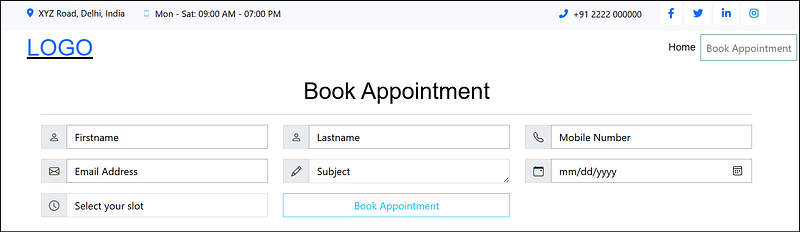
Below is the HTML code of the page
Below is the JS Code
Below is the image after the appointment is booked
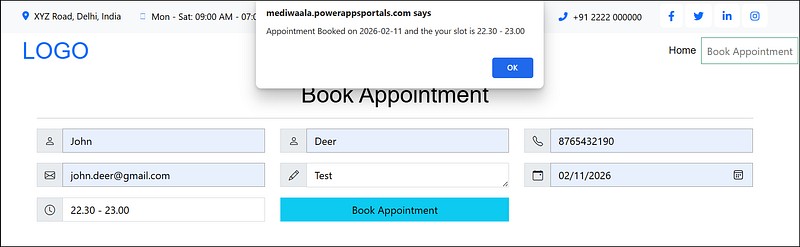
References
-
[Power Pages Client APIs Overview (preview) Microsoft Learn](https://learn.microsoft.com/en-us/power-pages/configure/client-api) -
[Power Pages Client API supported controls (preview) Microsoft Learn](https://learn.microsoft.com/en-us/power-pages/configure/client-api-controls)
Have a great day!




Comments